> For the complete documentation index, see [llms.txt](https://docs.revenium.io/llms.txt). Markdown versions of documentation pages are available by appending `.md` to page URLs; this page is available as [Markdown](https://docs.revenium.io/track-and-control-costs/analyze-ai-tooling-spend/setup-claude-cowork/claude-cowork.md).
# Claude Cowork Dashboard
**In the product:** `https://app.revenium.ai/ai-assistants/claude-cowork`, or **Intelligence > AI Assistants > Claude Cowork**.
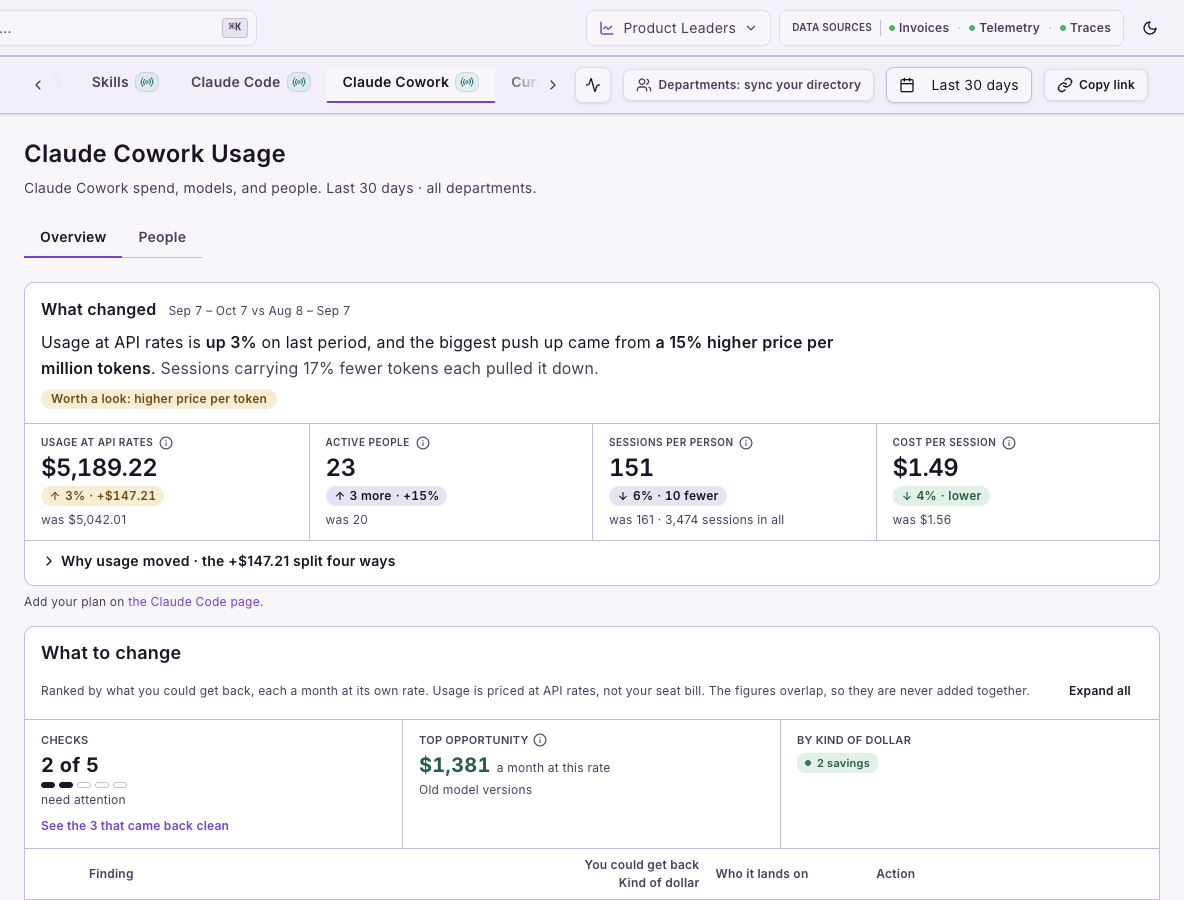
The Claude Cowork dashboard shows what your teams spend on Cowork, who is spending it, whether sessions are getting cheaper, and what to change. Setup steps are shown on screen; this page covers what the dashboard needs, how it works, and how to read it.
## What it needs
* **Claude Cowork telemetry**, enabled once by an organization administrator as described in [Set up Claude Cowork](/track-and-control-costs/analyze-ai-tooling-spend/setup-claude-cowork.md).
* **Departments**, optional, to read spend and findings by department. See [Attribute Spend to Departments](/track-and-control-costs/attribute-spend-to-departments.md).
* **A seat plan**, optional. Cowork has no seat plan tab of its own; one plan and its seats cover Claude Code and Claude Cowork, and they live on the [Claude Code dashboard](/track-and-control-costs/analyze-ai-tooling-spend/setup-claude-code/claude-code.md) under **Claude Code > Seats & plan**.
With no usage in the selected range, **Overview** and **People** show an empty state.
## Reading the numbers
### Overview: what changed, and what should we change?
**Overview** opens with what changed from the previous period: usage at API rates, active people, sessions per person and cost per session. **What to change** lists findings with their evidence and a suggested action. In **Departments** view a finding shows the departments it lands on; in **People** view it shows the people.
### What to change: what kinds of finding are there?
Each finding is a check on your telemetry. The checks fall into these families, and each finding states its kind of dollar:
| Check family | Examples |
| ------------ | ------------------------------------------------------------------------------------------------ |
| Context | **Context carried past 200K tokens**, **Cache rebuilt after a break** |
| Model choice | **Flagship model by default**, **Old model versions**, a newer version reported cheaper per task |
| Kind of dollar | Meaning |
| --------------------------- | ----------------------------------------------------------------------------- |
| **saving on the seat bill** | Seat cost you would stop paying each month, measured on your seat bill |
| **saving, measured** | The gap between this spend and your team's own rate, measured from your usage |
| **saving, estimated** | An estimate of what could be saved, from your team's usage |
| **saving if upgraded** | What moving to the current model version would save, priced at API rates |
| **needs inspection** | Spend worth looking at; no saving is claimed |
Checks that came back clean are listed under **Looking good**. Each check's explainer, threshold and how it is computed are shown on screen under its information icon.
### Spend over time: is Cowork getting cheaper?
The chart has three modes:
* **Cost per session**: is each session getting cheaper or dearer?
* **$ per million tokens**: did the price of the work change, for example from a different model mix?
* **Spend and sessions**: did volume or price move the total? Switch the line between **Spend**, **Sessions** and **People active**.
### Who is spending: by department or by person
What you see below the chart depends on whether departments are synced:
* **With departments synced:** **Spend by department** ranks the top departments by spend and groups the rest under **Other**; select a name to filter **People**. When there are more departments than the card shows, **See all … departments** opens a searchable list of every department with spend in the period, a page at a time, and **Back to the top …** returns to the card. **What to change** offers **Departments** and **People** views, and anyone with no directory entry is grouped under **No department**.
* **Without departments:** **Spend by person** ranks the top spenders, with everyone else grouped in one row, and the page header offers **Departments: sync your directory**.
**Claude Cowork Cost by Model** shows cost by model as **Totals** or **Over Time**; use **Manage Columns** to choose its columns.
### People: who is driving the spend?
Select a person's name in **Spend by person** or on **People** to open their details: spend over time, any flag on their usage, and a token type breakdown you can expand by model. A flag such as **Oversized context** opens the matching finding on **Overview**. **See all … people** opens the **People** tab with everyone in the period.
On a finding's department breakdown, **See people** opens the **People** tab filtered to that department, including its sub-departments, and to that finding, sorted by that finding's spend; for **Cache rebuilt after a break** that is the **Spent re-uploading** column. The department and the finding show as chips at the top of the list; remove a chip to widen it.
### Long conversations: who should we talk to?
The **Context carried past 200K tokens** finding opens the **Conversation depth** card. It groups assistant turns by how much context they carry and shows each group's share of turns and spend, then shows whose middle turn falls in each band, by person or by department. Use the card to decide whom to ask about the pattern; context size alone does not tell you whether the work was necessary.
## Limits
* Skill cost is currently an approximation and is not shown on this dashboard; it appears on **Intelligence > AI Assistants > Skills**. Use a skill's cost to compare skills and to see where spend concentrates, not as an exact amount.
* Conversation depth needs telemetry with session and token data; without it the card shows an empty state.
* Cowork usage is valued at API rates, not at your seat bill.
---
# Agent Instructions
This documentation is published with GitBook. GitBook is the documentation platform designed so that both humans and AI agents can read, navigate, and reason over technical content effectively. Learn more at gitbook.com.
## Querying This Documentation
If you need additional information that is not directly available in this page, you can query the documentation by asking a question.
Perform an HTTP GET request on the following URL with the `ask` and `goal` query parameters:
```
GET https://docs.revenium.io/track-and-control-costs/analyze-ai-tooling-spend/setup-claude-cowork/claude-cowork.md?ask=&goal=
```
`ask` is the immediate question: it should be specific, self-contained, and written in natural language.
`goal` is what the user is ultimately trying to achieve, the reason they need the answer. Sharing it helps GitBook give you a better, more relevant answer. A goal is most helpful when it describes the outcome the user wants rather than restating the question. For example, with `ask=how do I create an API token`, a goal like `automate deployments from our CI pipeline` lets GitBook tailor the answer to that use case.
The response will contain a direct answer to the question and relevant excerpts and sources from the documentation.
Use this mechanism when the answer is not explicitly present in the current page, you need clarification or additional context, or you want to retrieve related documentation sections.